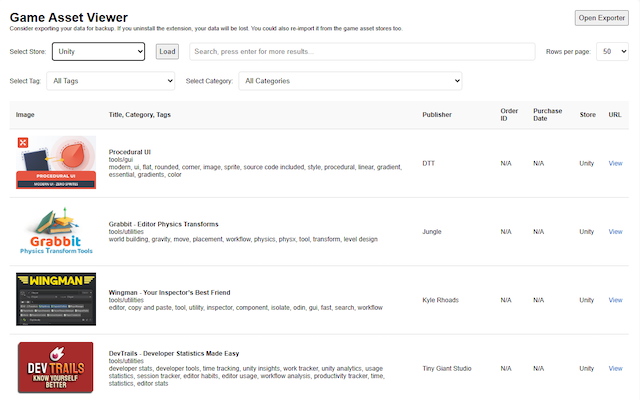
Game Developer Assets Inventory is an advanced browser extension specifically crafted to streamline and organize the extensive digital asset collections of game developers, 3D artists, and digital creators. When acquiring assets like 3D models, sound samples, textures, environment packs, or entire project templates from multiple major marketplaces, managing and tracking these resources can become a challenging and fragmented task. This extension addresses that challenge by unifying asset metadata from diverse storefront accounts into a single, searchable, filterable, and locally stored inventory database that you maintain and control.
Designed to integrate seamlessly with over a dozen prominent game development marketplaces — including CGTrader, Unity Asset Store, TurboSquid, Daz3D, GameDev Market, Gumroad, KitBash3D, RenderHub, Synty, Blender Market, 3DShards, Fab Unreal, Leartes, Ovani Sound, and more — the extension smartly parses detailed information from your purchase and download history pages. It employs tailored extraction scripts for each supported store to reliably capture key asset details such as the asset title, category, publisher, purchase date, tags, preview images, store URLs, and order identification numbers. This allows you to compile a detailed personal archive effortlessly without manually copying data from each site.
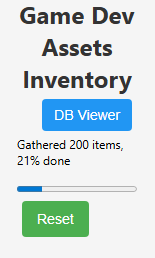
The user interface is thoughtfully designed for intuitive and efficient asset management. From the extension's popup, you can initiate the asset gathering process by selecting the relevant storefront page. Real-time progress indicators keep you informed throughout the parsing operation, with options to pause, reset, or resume as needed. Your collected data is then accessible through a rich database viewer within the extension, enabling you to browse your entire inventory, perform advanced searches, apply multiple filters, and paginate through large asset collections smoothly.
See the Github page for the source code.
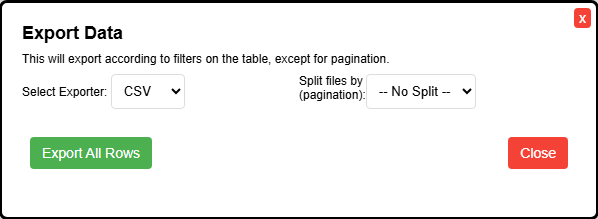
Your asset data remains entirely private and secure as Game Developer Assets Inventory stores all information locally on your computer via the browser’s IndexedDB. There is no cloud storage or data transmission involved, ensuring that your valuable asset library remains confidential and under your complete control. For added flexibility, the extension supports exporting your inventory—either in full or filtered selections—into various popular formats such as CSV, Excel spreadsheets, JSON, or plain text files. These export options enable backups, sharing, or integration with other project management and tracking tools.
By periodically revisiting supported storefronts and re-running the gathering process, you can keep your library up to date with new purchases or downloads, seamlessly merging new entries into your existing database without duplicating effort. This systematic approach empowers developers to maintain a well-organized, accessible, and efficient personal asset repository that significantly reduces administrative overhead and enhances workflow productivity.
Unified Asset Library Collection: Gather comprehensive metadata from all supported stores in one place with ease, including titles, publishers, categories, acquisition dates, tags, preview images, and download links.
Extensive Multi-Store Integration: Supports a broad range of digital marketplaces commonly used by game developers, with content scripts automatically adapting to each store’s page layout and data structures.
Local-Only Data Storage: All asset information is securely saved within your browser’s local database (IndexedDB), guaranteeing privacy and data persistence without any cloud syncing or external uploads.
Powerful Search and Filtering Capabilities: Easily locate assets by name, category, publisher, date, or store using robust search and multiple filter options in a user-friendly paginated interface.
Flexible Export Options: Export your asset library or filtered asset sets to CSV, Excel, JSON, or plain text formats for use in spreadsheets, project management tools, or as backups.
Real-Time Inventory Progress Tracking: Visual progress bars and live status reports keep you informed during asset data extraction, with full control to pause, reset, or resume sessions.
Intuitive and Seamless User Interface: Manage all tasks—from scanning new assets to browsing and exporting your collection—directly from the extension popup and database viewer with a clean, accessible design.
All asset information remains stored locally within your browser’s database and is never transmitted to any external servers. This ensures your personal asset inventory remains private and secure. For details, please see the extension’s privacy policy.
This extension is built using vanilla JavaScript and emphasizes transparency and user control. Its source code will be available on GitHub for those interested in reviewing or contributing. If you are a game developer seeking to bring order and clarity to a sprawling digital asset collection, Game Developer Assets Inventory offers an indispensable, safe, and highly effective solution.